MCP Server
The OSO MCP server gives AI agents full access to the OSO data platform, including delegating data tasks to OSO agents, using the Model Context Protocol over Streamable HTTP. This empowers your agent to do anything you can do in the OSO app.
| Property | Value |
|---|---|
| Server URL | https://mcp.artio.so/mcp |
| Transport | http (Streamable HTTP) |
| Authentication | Authorization: Bearer <YOUR_TOKEN> |
Connectors saved with the old https://mcp.oso.xyz/mcp URL keep working.
Connect Claude.ai with OAuth
Claude.ai connects over OAuth rather than an API key, so there is nothing to paste or store and the connection is limited to the permissions you approve.
- In Claude, add a connector pointing at
https://mcp.artio.so/mcp. Leave the client ID and secret fields empty — this route uses neither. - Sign in to OSO when Claude sends you there.
- On the consent screen, tick the organizations Claude may act on, and approve.
- Back in Claude, ask "what OSO tools do you have?" to confirm the connection.
Claude needs no credentials because it identifies itself with a Client ID
Metadata Document: its client_id is an HTTPS URL that OSO fetches to learn
who the client is, admitted only from an allowlist of origins — by default
Claude's own (https://claude.ai and https://claude.com).
You must be an owner or admin of at least one OSO organization to connect,
and an owner/admin authorizes each organization individually. Grants show up
in that organization's Settings → OAuth Apps, where they can be revoked. If
you are not an owner or admin anywhere, there is no request-and-approve
flow — ask an administrator to connect on their side, or to make you an admin.
OSO is not yet listed in Claude's connector directory. Until it is, add it by URL as above; the OAuth flow is identical either way.
Building your own integration and want it to carry your organization's own credentials? See OAuth applications.
Generate an API key
- Log in to your account
- Navigate to your organization's Settings → API Keys
- Click "New Key +" and give it a descriptive name
- Save your key immediately - you won't see it again
Detailed step-by-step instructions
- Go to www.artio.so and log in
- You'll be redirected to your organization dashboard
- In the left sidebar, click the dropdown next to your organization name
- Select "Settings"
- Navigate to "Organization" → "API Keys"
- Click "New Key +"
- Enter a descriptive label (e.g., "Production API")
- Copy and save your key immediately
- Click "Create"
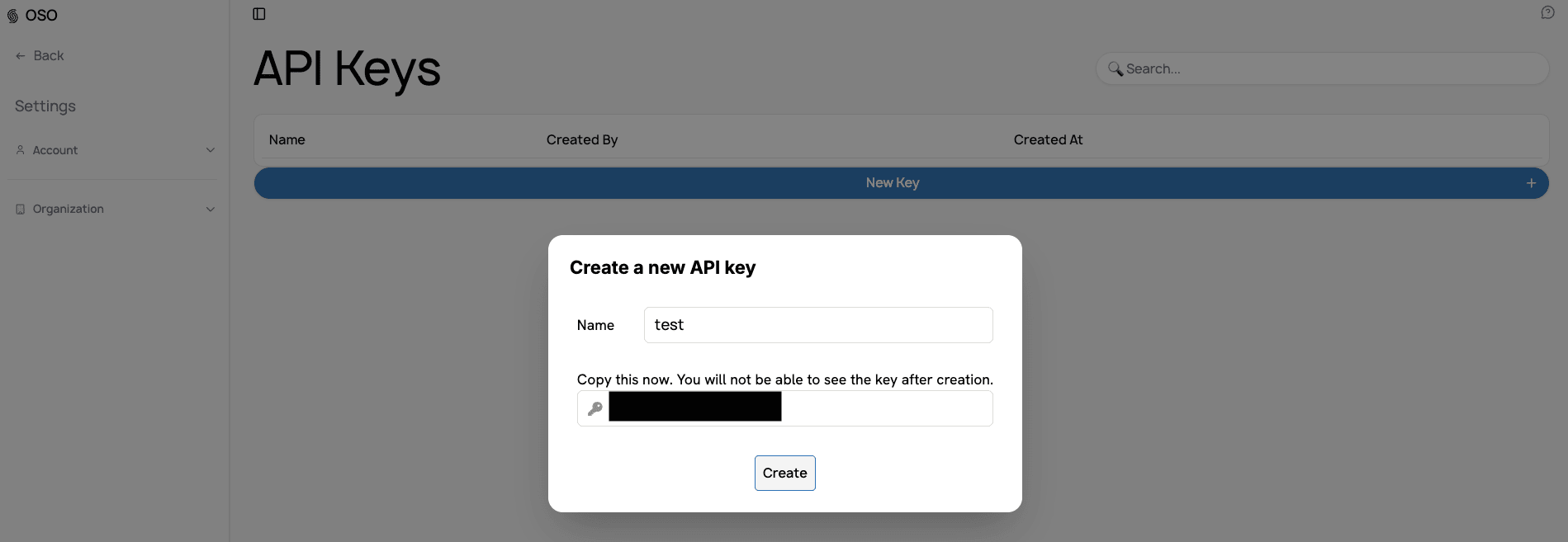
Treat your token like a password — it grants full access to your OSO data. Never commit it to git or paste it into shared config.
Configure your agent
Claude Code
claude mcp add --transport http artio https://mcp.artio.so/mcp \
  --header "Authorization: Bearer ${OSO_TOKEN}"
| Flag | Effect |
|---|---|
--scope local (default) | This project only, just you |
--scope user | Available across all your projects |
--scope project | Written to a shared .mcp.json — commit it, but use an env var for the token |
Verify with claude mcp list or the /mcp command inside a session. A healthy
server shows as connected.
See the Claude Code MCP docs for more.
Codex CLI
codex mcp add artio --url https://mcp.artio.so/mcp \
  --bearer-token-env-var OSO_TOKEN
--bearer-token-env-var names an environment variable (here OSO_TOKEN) whose
value Codex sends as the bearer token — set it in your shell before running
the command. This writes an entry to ~/.codex/config.toml; you can edit it
directly instead:
[mcp_servers.artio]
url = "https://mcp.artio.so/mcp"
bearer_token_env_var = "OSO_TOKEN"
Verify with codex mcp list, or type /mcp inside a Codex CLI session to see
active servers.
See the Codex MCP docs for more.
OpenClaw
openclaw mcp set artio '{"url":"https://mcp.artio.so/mcp","transport":"streamable-http","headers":{"Authorization":"Bearer '"${OSO_TOKEN}"'"}}'
This writes to ~/.openclaw/openclaw.json; you can edit it directly instead:
{
  "mcp": {
    "servers": {
      "artio": {
        "url": "https://mcp.artio.so/mcp",
        "transport": "streamable-http",
        "headers": {
          "Authorization": "Bearer <YOUR_TOKEN>"
        }
      }
    }
  }
}
Add the entry to your workspace's .mcp.json instead of the gateway config if
you only want one agent to have access. OpenClaw doesn't surface MCP
connection failures in chat — check the gateway log if tools seem to be
missing.
See the OpenClaw MCP docs for more.
Available tools
Once connected you'll have tools to explore and query the OSO Data Lake — listing datasets, inspecting schemas, and running SQL. Ask your agent "what OSO tools do you have?" to see the current set.
Troubleshooting
| Symptom | Fix |
|---|---|
401 Unauthorized | Token missing, expired, or malformed. Confirm the header is exactly Authorization: Bearer <token>. |
| Claude Code: not listed | Run claude mcp list to confirm it's registered; re-add with the correct --scope. |
| Codex CLI: not listed | Run codex mcp list; confirm [mcp_servers.artio] in ~/.codex/config.toml and that OSO_TOKEN is set in your shell. |
| OpenClaw: tools missing | MCP failures don't surface in chat. Check the gateway log, and confirm the entry in ~/.openclaw/openclaw.json (or workspace .mcp.json). |
1. Check the server is reachable
curl -s -X POST https://mcp.artio.so/mcp \
  -H "Content-Type: application/json" \
  -H "Accept: application/json, text/event-stream" \
  -H "Authorization: Bearer ${OSO_TOKEN}" \
  -d '{"jsonrpc":"2.0","id":1,"method":"initialize","params":{"protocolVersion":"2024-11-05","capabilities":{},"clientInfo":{"name":"curl","version":"1.0"}}}'
A successful response includes "serverInfo":{"name":"Artio Data Lake Explorer",...}.
2. Check your account is working
Once the server is connected in Claude Code, ask directly in a session:
check if the artio mcp is working
Claude will call an OSO tool and confirm whether your token has valid access.